Haptic interfaces are used in many applications to convey mechanical information to users through touch. For example, a simple one degree-of-freedom (DOF) interface can be found on the Rivian R2 in the form of a steering-wheel mounted haptic knob. At the other extreme, LapSim by Surgical Science, uses 5-DOF per hand to convey tissue interaction forces to medical trainees. In both cases, the electro-mechanical design of the hardware is optimized to have as little friction, backlash, damping, and inertia as possible. These examples fall into the category of impedance‑based haptic interfaces. The user can move freely through the virtual environment, and the haptic device can add forces (known as mechanical impedances) when appropriate based upon the user’s position/velocity. A typical impedance-based system diagram is found below.
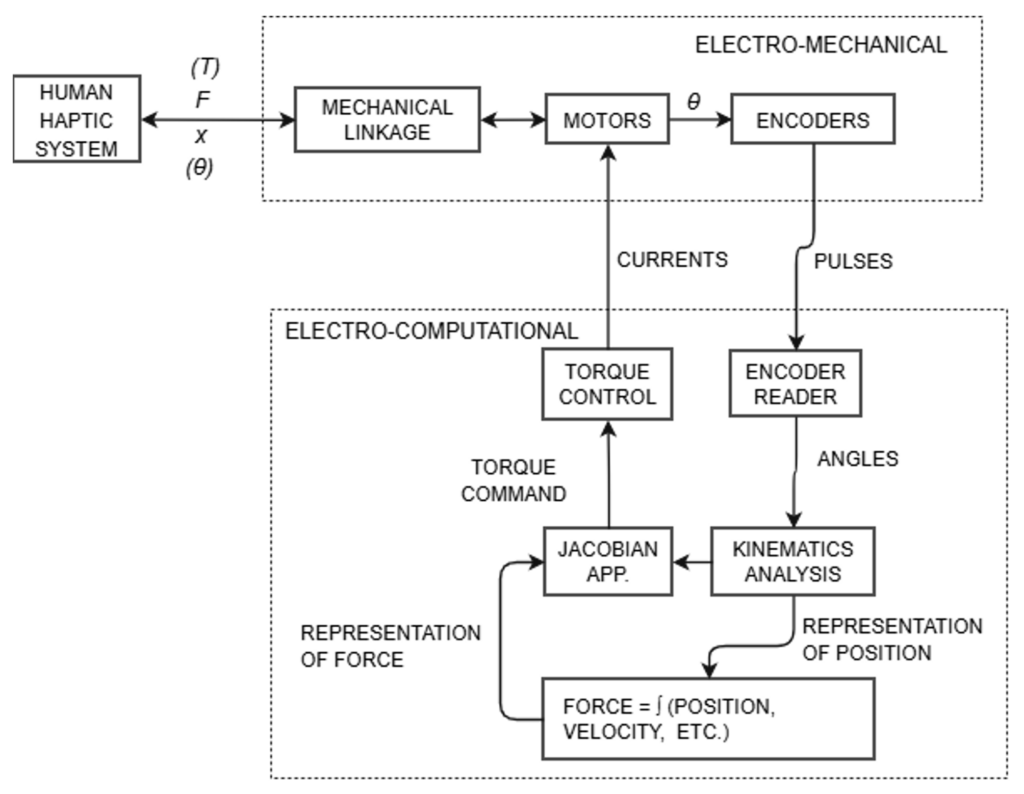
Impedance haptic interfaces typically use position encoders paired with DC motors to apply virtual environment forces. To maintain the low friction and backlash, mechanical amplification is usually cable or belt driven. Structural members are usually tubular carbon fiber or machined aluminum to keep stiffness high and inertia low.
Simplexity has a long history of developing and integrating haptic feedback in a wide array of medical, Virtual/Augmented Reality, and consumer products. This blog outlines some examples of the underlying algorithms that display different detents in a rolling wheel, like those referenced in our Smart TV Remote case study.
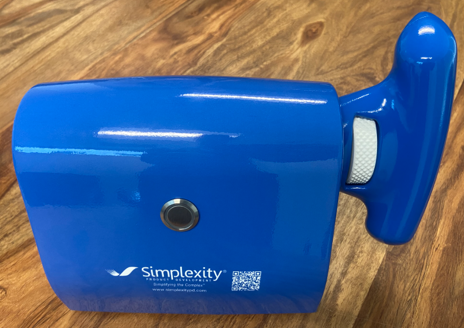
Three distinct scrolling scenes were developed and tuned on Simplexity’s haptic knob demo, pictured blow, for three specific user interactions.
Parabolic ‘Clicks’
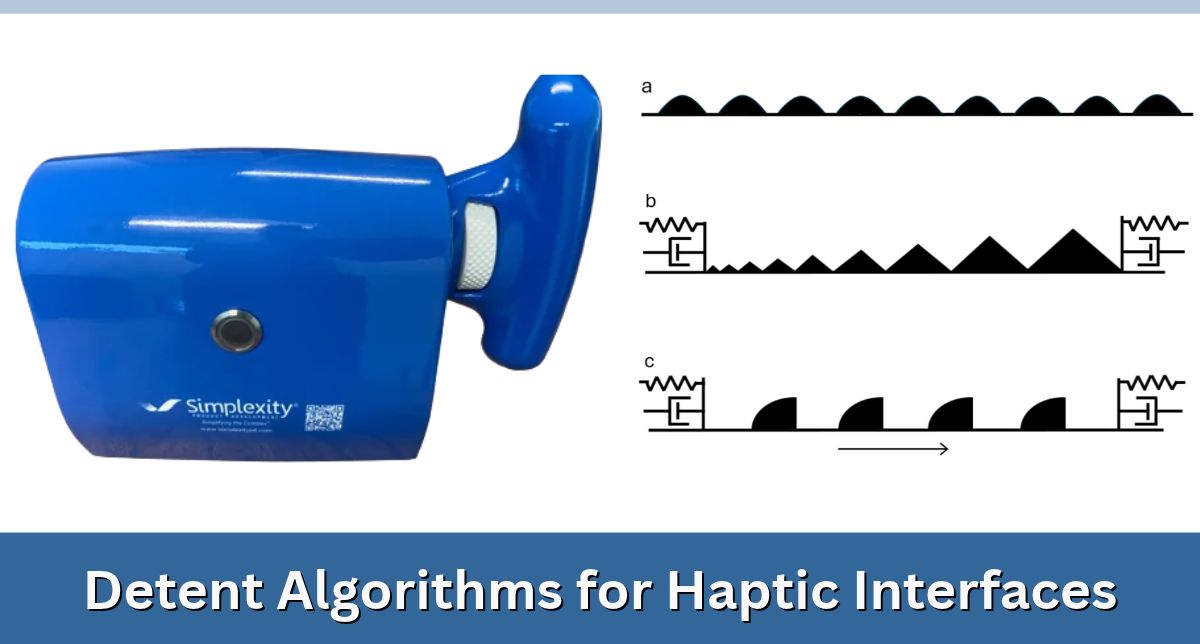
For the case where detents are relatively small, we’ve found that parabolas can quickly help tune a very ‘clicky’ effect. The three quadratic coefficients a, b, c define the shape of the parabola, and width defines how wide the detent is in firmware. The coefficient a is negative, which inverts the parabola and sets the overall shape. The coefficient b is usually set to zero or a very small value. And c is the vertical offset, which is set in close conjunction with the width to have any desired dead-space between detents. This haptic rendering is excellent for a scroll wheel that, for example, tunes the radio. As the user scrolls through the frequency stations, crisp little ticks are presented each 0.1 MHz (in the FM case). When the user gets to 108.1, the wheel loops around and starts in the high 80s. These clicks also feel excellent for scrolling through a song or video to get to a specific spot.

Triangular ‘Wells’
These are linear springs that anchor the user’s position to a fixed set of nodes/vertices. Imagine that the lowest peak of each black triangle is a node. A restorative spring force is rendered that keeps the user anchored to this node. The user stays anchored to that node until breaking_strain is exceeded, then the user snaps to the next node. These anchor points can be placed at any spacing, and with whatever spring stiffness feel compelling. In the figure below, the nodes get farther apart as the user scrolls to the right. As the nodes get farther apart, the required breaking_strain increases, so the detents feel larger and harder to push past. This scene is useful for a volume knob, where it gets progressively harder to raise the volume (to protect your sensitive ears), and when the user gets to the maximum volume they are met with a virtual wall.

Sinusoidal Frictional ‘Thumps’
This algorithm feels noticeably different from the other two — more passive and quieter. These detents are a spatial super-position of a sinusoidal amplitude grating with an underlying Hayward friction model. This model is based upon a motion-opposing elastic strain force that is computed based upon a virtual anchor point and the user’s location. The interesting algorithmic point here is that this anchor point can slide when the strain exceeds a parameter max_strain. When max_strain is exceeded, the opposing force is constant, much like many models of dry friction. When the user slows down, the virtual anchor point stops sliding, and the user is contained to this point. The authors Hayward and Armstrong describe this behavior as “physically inspired” because any dry sliding contact has elastic pre-strain before sliding (and this elastic pre-strain can be very stiff).
This scene feels like large rounded ‘thumps’. They are much less active than the wells and/or clicks. They don’t pull the user into the next detent; they simply release and let inertia carry the motion. These shapes are good for switching modes, or selecting between applications, and they definitely feel distinctly different than clicks and wells which have a ‘tick-tick’ perception.

Conclusion: Detent Algorithms for Haptic Interfaces
Though haptics has been an active field of academic research for decades, improvements in the cost structure and package size of actuators has caused the adoption haptic interface technology into modern products to accelerate recently. Hopefully, this blog has given some insight into how engineers and UX designers can add intuitive and compelling haptic feedback to their future products!
 Software: Design Complete
 Hardware: Pre-production units for design verification
 MFG. Readiness: CM schedule and budget, Unit build tracking